
Tag Assignment
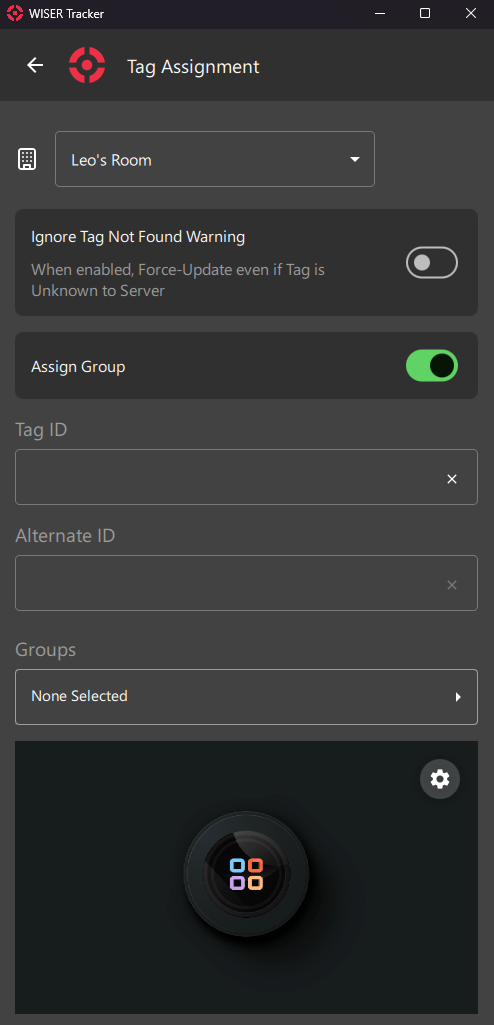
This Screen is a quick way of editing Tags. It works like a shortcut, available from the First Steps: Home Screen
It is usually used for Assigning new Tags or Setting up a new Work Order for a new Cycle of Operation.
A Barcode Scanner is also available for Devices with a Camera.
Arena Filter
Section titled “Arena Filter”Select the Arena you want to Assign Tags.
Special Options
Section titled “Special Options”Ignore Tag Not Found Warning
Section titled “Ignore Tag Not Found Warning”Sometimes recently arrived Tags still haven’t got a Ping from the server and so, they are Unknown.
To avoid such warning and a Failed Update, you can toggle this option.
Assign Group
Section titled “Assign Group”This option will enable/disable the Groups Field
Input Fields
Section titled “Input Fields”Tag ID
Section titled “Tag ID”Tag Hex ID
You can use a Keyboard, a Portable Barcode Scanner or your Device’s Camera.
Alternate ID
Section titled “Alternate ID”You can use any kind of internal ID, like Work Order, Part Number and so on.
Groups
Section titled “Groups”Select Pre-defined Groups
Camera Preview
Section titled “Camera Preview”Camera-Available Devices will have a Preview Screen. You can click the Gear Icon for a few Settings and Camera Device Selection.